

Flutter Alignment: Main Axis Alignment VS CrossAxis Alignment

Am a young techie passionate about Android and Java stuff, not the most skilled, but am sure getting a hang of it...
Alignment in flutter can be confusing sometimes, this minute it seems like you are understanding it the next minute it seems hard. So in this article, I would try to explain the difference between the main-axis alignment and cross-axis alignment property in Flutter, I hope you find it informative.
Main-Axis Alignment
Take a look at the code snippet below
    child: Column(
            mainAxisAlignment: MainAxisAlignment.center,
            children: [
              ButtonAnimation(Color.fromRGBO(57, 92, 249, 1),
                  Color.fromRGBO(44, 78, 233, 1)),
              SizedBox(
                height: 20,
              ),
              ButtonAnimation(Colors.yellow.shade700, Colors.yellow.shade800),
              SizedBox(
                height: 20,
              ),
              ButtonAnimation(Colors.green.shade400, Colors.green.shade600),
              SizedBox(
                height: 20,
              ),
              ButtonAnimation(Colors.red.shade700, Colors.red.shade800)
            ],
          ),
Here is the result of the code
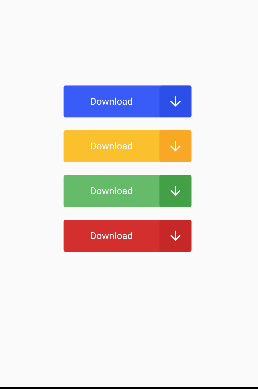
From the result above you would see that each of those rectangles is arranged vertically and also centralized, this is made possible by two things one is the child of that code which is a column and we know a column represents a top to bottom arrangement of something, in this case, the top to bottom arrangement of the children it houses, secondly is the main-axis alignment property which in this case wants the rectangles centralized.
Primarily the main-axis alignment property is concerned with the top to bottom arrangement of the children similar to a column if you like, let's say the child in the code snippet above was a row and every other thing stays, your result would look like this.
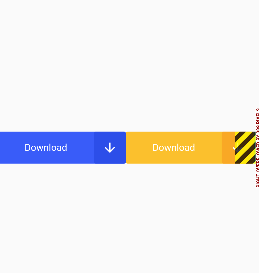
It tries to centralize the children as specified by the main-axis alignment property, this is the idea behind the main-axis alignment property, top to the bottom arrangement. and of course, your main-axis alignment has other properties like start, end, space-around, space-between, space-evenly.
🤗
Bye for now


